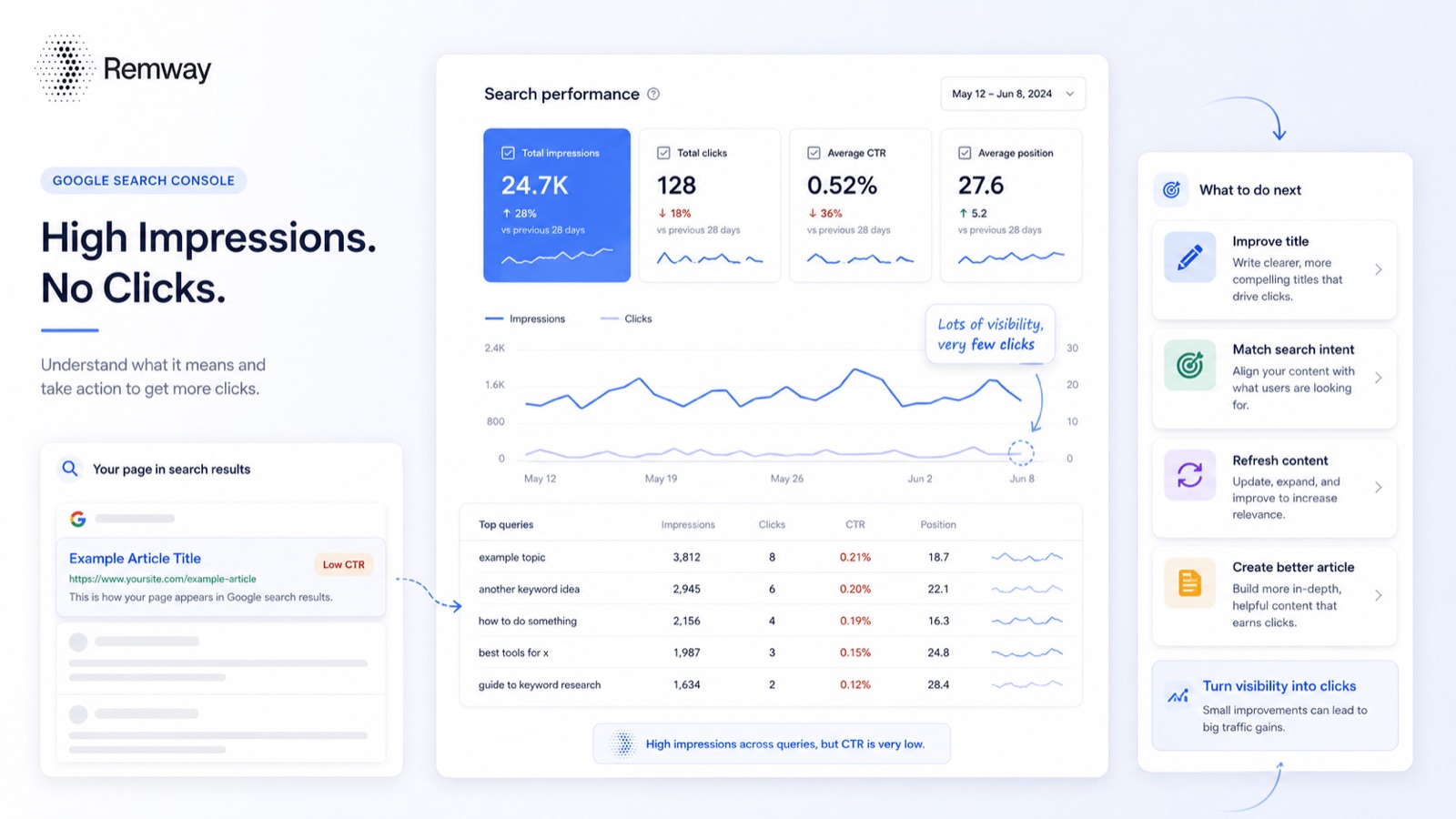
Google Search Console impressions but no clicks is one of the most common situations website owners notice when reviewing their search data. It means your pages are appearing in Google Search results, but users are not clicking through to your site. This can happen for several reasons, including low rankings, weak page titles, poor search intent matching, or SERP features that answer the query before any click happens. Importantly, impressions are still useful. They show that Google is already associating your website with certain topics, which creates real content opportunities worth acting on.
Quick Answer
If Google Search Console shows impressions but no clicks, your page is appearing in search results but not attracting visitors. This usually means the page ranks too low, the title is not compelling enough, the content does not fully match the search intent, or the search results page gives users the answer before they click. The best fix is to review the query, improve the title and meta description, strengthen the content, and decide whether the topic needs a better page or a new article.
What Do Impressions Mean in Google Search Console?
First, it helps to understand exactly what an impression is. An impression is counted every time a page from your website appears in Google Search results for a query. However, impressions do not mean someone visited your website. They measure visibility, not traffic.
Additionally, a page can receive impressions even when it ranks on page two or lower. Google may display your result for a query without users ever scrolling far enough to see it. That said, impressions can still reveal useful information about how Google understands your site.
For example, impressions can show you:
- Which topics Google already connects to your website
- Where your site has early relevance signals
- Which queries could become useful content opportunities
- Where your average position needs to improve before clicks become likely
- Which pages may need stronger titles or better search intent alignment
In short, impressions are a visibility signal. They show where your website may already have some relevance, even if organic traffic has not followed yet.
Why Google Search Console Impressions But No Clicks Happens
There are several reasons why Google Search Console impressions but no clicks appears in your data. Furthermore, the reason matters because it shapes the fix. The table below covers the most common causes and what to check for each one.
| Reason | What It Means | What to Check |
|---|---|---|
| Your ranking is too low | The page appears in search results but not high enough to attract clicks. | Check the average position for the query. |
| Your title is not compelling | Users see your result but choose another result instead. | Review the page title and compare it with competing results. |
| The search intent is not matched | The page appears for the query but does not look like the best answer. | Check whether the content directly answers the search. |
| The query is informational | The user may get enough information directly from the search page. | Look for featured snippets, AI summaries, or quick answers. |
| The query is not relevant | Google may be testing your page for a topic that is not useful to your business. | Check whether the query matches your offer, audience, or content strategy. |
Is It a Problem to Have Impressions But No Clicks?
Not always. For a new website, impressions are often a positive early signal. They show that Google is starting to display your pages for real search queries. Therefore, seeing impressions before clicks is a normal part of building search visibility.
However, impressions without clicks can become a real issue when:
- The query is highly relevant to your product or service
- Impressions are growing steadily but clicks stay at zero
- The average position is close to page one
- The page should be attracting organic traffic but clearly is not
- Multiple related queries show the same pattern
In those cases, impressions without clicks signal a gap between your visibility and your click-through rate. Consequently, the fix is usually about improving the page rather than creating something entirely new. Impressions are not a failure. They are a signal. The question is whether the query is relevant enough to act on.
How to Diagnose the Issue in Google Search Console
Moreover, diagnosing Google Search Console impressions but no clicks is straightforward when you follow a clear process. Open Google Search Console and work through these steps.
Step 1: Open the Performance Report
Go to Google Search Console and open the Performance section. Select Search results and choose a date range of at least three to six months. This range gives you enough data to spot consistent patterns rather than short-term noise.
Step 2: Filter by Queries
Look at the exact queries generating impressions with zero or very low clicks. For each query, ask yourself: Is this relevant to my audience? Does it connect to what I offer? Could it become a useful article or page? These questions help you separate valuable content opportunities from irrelevant noise.
Step 3: Check Average Position
Average position explains whether the issue is ranking or CTR. Use the table below to interpret what you see.
| Average Position | Likely Meaning | Best Action |
|---|---|---|
| 1–5 | You are visible but not getting enough clicks. | Improve the title, meta description, and search intent alignment. |
| 6–10 | You are near the top but may need stronger relevance. | Improve content depth, headings, and examples. |
| 11–20 | You are usually on page two or lower. | Refresh the page or create supporting content. |
| 21+ | You have visibility but not enough ranking strength yet. | Only act if the query is highly relevant to your business. |
Step 4: Check the Page Behind the Query
Click the query and view which page is getting the impressions. Then ask: Is this the right page for the query? Does it answer the question directly? Is the title specific enough? Sometimes the wrong page ranks for a query, and that alone explains the low CTR.
Step 5: Check the Search Results Manually
Search the query yourself and review what currently ranks. Look for AI overviews, featured snippets, ads, and competing articles. If the top results are detailed guides and your page is a short product description, the search intent mismatch is clear. Similarly, if an AI overview answers the query in full, clicks for that query may always be low regardless of your ranking.
How to Improve Clicks From Impressions
Once you understand the cause, you can apply the right fix. Here are practical ways to improve clicks when you see Google Search Console impressions but no clicks in your data.
Improve the Page Title
The title is usually the first thing users judge. A vague title loses clicks even when the page ranks well. For example, a title like SEO Tips for Businesses is too broad. A stronger version would be How to Find SEO Content Opportunities in Google Search Console. The second title tells users exactly what they will get. Furthermore, it matches what someone searching for practical SEO guidance actually wants to find.
Improve the Meta Description
The meta description supports the title by clarifying what the reader will learn. A weak meta description like Learn more about SEO and content strategy gives users no reason to click. A better version would be: Learn how to use Google Search Console impressions, clicks, CTR, and rankings to find better SEO content opportunities. This version is specific, useful, and directly connected to search intent.
Match the Search Intent More Clearly
Additionally, the content itself must match what the searcher wants to find. If someone searches for a diagnosis and fix, the page should open with a direct answer. It should not start with a broad overview of SEO history. Check the Google SEO Starter Guide for guidance on writing content that matches how people actually search.
Add Missing Sections to the Page
In many cases, a page ranks but fails to fully answer the query. As a result, users choose a competing result instead. Consider adding a quick answer box, clear definitions, a troubleshooting table, step-by-step instructions, real examples, or a FAQ section. These additions improve the page’s usefulness and signal to Google that it deserves a higher position.
Create a New Article When the Query Deserves One
Sometimes an existing page gets impressions for a query it was never designed to answer. In that case, creating a dedicated article may be more effective than updating the original page. For example, if your homepage gets impressions for a specific how-to question, that question deserves its own article rather than a forced answer on the homepage.
When to Ignore Impressions With No Clicks
Not every impression is worth acting on. Therefore, it is important to filter before you plan. Deprioritise or ignore queries if:
- They are unrelated to your product, service, or audience
- They are too broad to target with a focused page
- The search intent is unclear or inconsistent
- They have no realistic business value even with traffic
- You cannot create a genuinely useful and specific page around them
The goal is not to chase every impression in your account. The goal is to find the impressions that reveal real demand, relevant topics, and realistic content opportunities. Data-led SEO means being selective, not reactive.
How Remway Helps Turn Impressions Into Content Opportunities
Manually reviewing Google Search Console data is useful, but it can also become time-consuming. You may have hundreds or thousands of queries, and not every impression is worth acting on. Finding the right ones takes consistent effort and a clear process.
Remway helps make this process clearer. It connects to your Google Search Console account, finds content opportunities from real search data, and helps you turn those opportunities into SEO-ready articles that match your brand voice. Instead of manually sorting through impressions, clicks, and average position data, Remway surfaces the queries that actually deserve attention.
You can also read our guide on how to find content opportunities in Google Search Console for a deeper walkthrough of the process.
For content marketers, founders, and small teams, this kind of smarter content planning saves time and removes the guesswork from deciding what to write next.
Example: Turning Impressions Into a Real Article Idea
To illustrate how this works in practice, consider a website that sees the following queries in Google Search Console with impressions but very few clicks:
- Google Search Console impressions but no clicks
- high impressions low clicks
- improve CTR in Google Search Console
- why does my page get impressions but no traffic
These queries all point to the same underlying problem. Consequently, instead of creating four separate pages, one strong and well-structured article can answer the full topic. The table below shows how each query maps to a content response.
| Query | User Problem | Content Response |
|---|---|---|
| Google Search Console impressions but no clicks | The user sees visibility but no traffic. | Explain what it means and how to fix it. |
| high impressions low clicks | The user wants to understand low CTR. | Explain title, intent, ranking, and SERP factors. |
| improve CTR Google Search Console | The user wants more clicks from existing visibility. | Give title, meta, and content improvement steps. |
| SEO impressions no traffic | The user is confused by impressions without visits. | Clarify the difference between impressions and clicks. |
This is exactly how data-led SEO works. Real search queries tell you what people want. Furthermore, grouping related queries helps you build one useful article rather than several thin ones.
Common Mistakes to Avoid
Finally, here are the most common mistakes people make when dealing with Google Search Console impressions but no clicks. Avoiding these will save time and produce better results.
- Treating every impression as a valuable content opportunity
- Ignoring average position when diagnosing low CTR
- Rewriting titles without first checking the search intent
- Creating too many thin articles for similar queries
- Expecting every impression to eventually produce a click
- Ignoring SERP features like AI overviews and featured snippets
- Not checking which specific page is ranking for the query
- Chasing search volume instead of relevance
- Publishing articles without human editing or genuine usefulness
- Not tracking performance changes after updating a page
Above all, focus on content that is genuinely useful to your audience. Google’s own guidance on helpful, people-first content consistently emphasises relevance and usefulness over technical tricks.
Frequently Asked Questions
What does impressions but no clicks mean in Google Search Console?
Google Search Console impressions but no clicks means your page appeared in Google Search results, but users did not visit your website. This usually happens because the ranking is too low, the title is not compelling, the search intent is not matched, or the results page gives users enough information without clicking. It is a common pattern, especially for newer pages or broad queries.
Are impressions without clicks bad for SEO?
Not always. Impressions are a positive sign that Google is displaying your website for certain queries. They become more important to act on when the query is directly relevant to your business, impressions are growing consistently, and the average position suggests the page could realistically attract clicks with some improvements to the title or content.
How do I get more clicks from impressions in Google Search Console?
You can improve clicks by rewriting the page title to be more specific and compelling, improving the meta description, aligning the content more closely with search intent, adding useful sections the page currently lacks, and strengthening the page’s overall depth and relevance. For Google Search Console impressions but no clicks issues at position 6–10, improving content quality often helps ranking and CTR together.
What is a good CTR in Google Search Console?
A good CTR depends on the query, ranking position, brand recognition, search intent, and how the results page looks. There is no single benchmark that applies to every situation. Instead of chasing one target number, compare CTR across your own queries, pages, and average positions to identify where performance is weaker than expected.
Why do I get impressions but no traffic from Google Search Console?
Google Search Console impressions but no traffic usually means your page appears too low in search results to attract clicks, the title does not stand out, or the query is one where users find their answer directly on the results page. Check average position first. Then review the title and whether the page matches the search intent clearly enough to earn a click.
Should I create a new article for a query with impressions but no clicks?
Create a new article if the query has a clearly different search